


When your operation grows, the problem isn't “making a shipment”. The problem is managing many shipments at once, with multiple products, multiple destinations, and different statuses within the same order.
That's why we launched Bord's new tracking system: a cleaner, clearer view, with more useful information so you can understand what's happening with your orders no matter whether you have 1, 2, or 20 shipments.
What changes with this new tracking?
This update isn't just “a redesign”. We changed the tracking so that you (and your team) can:
- See the complete order history.
- Understand the real structure of an order (destinations, shipments, and products).
- Follow each shipment with clearer and more consistent statuses.
- Gain traceability by product, within the same order or service.
- Navigate faster thanks to performance improvements.
In short: more control, less confusion.
The new Orders view: the essentials, at the top (and in sight)
In the top panel of the order you'll find the basic data to get oriented in seconds:
- Order number
- Creator
- Estimated delivery date (according to SLA)
- General status (including the new “Partially Delivered” status, ideal when an order has multiple shipments and not all have arrived yet)
This reduces internal friction and avoids the classic: “has this order arrived or is it something missing?”
“Destinations” section: all the detailed information by destination
In the Destinations tab you'll see the order organized by its real logic: where it's going, who receives it, what's being shipped, and how it's progressing.
Each destination includes:
- Complete address
- Person who receives and contact
- Clear identification of shipments associated with that destination
- Quick access to tracking detail
This is key in regional operations, where a single customer may have deliveries in different cities.

Tracking by shipment: total clarity (even with multiple shipments)
Within each destination, you can enter each Shipment (Shipment 1, Shipment 2, etc.) and see:
- The current status
- Date and time of the last event
- Tracking messages/updates
- The detail of products associated with that shipment
So if an order includes, for example, laptop + monitor + chair (onboarding) and they travel in separate shipments, you can understand exactly what arrived and what's missing.
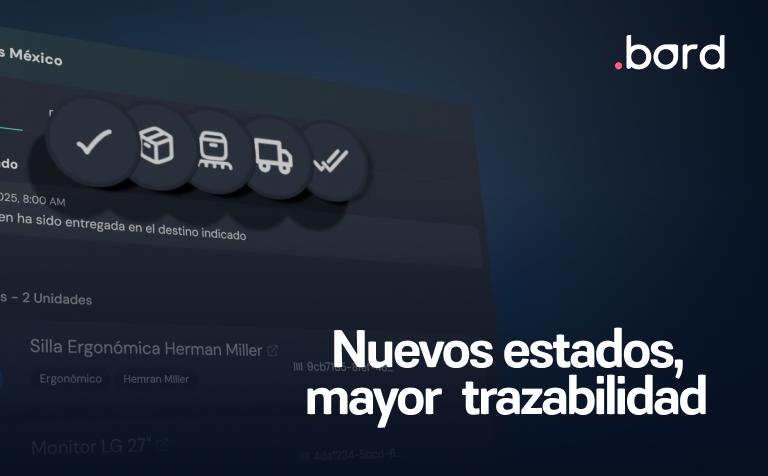
5 new statuses: more traceability for your orders
Useful tracking isn't one that “says something”. It's one that always says the same thing, and is understood in seconds.
That's why we standardized shipment statuses to:
- Preparation
- In Transit to Warehouse
- In warehouse
- In Transit to Destination
- Delivered
And we also added a key order-level status: “Partially delivered”, when part has arrived but shipments are still pending.
“Payments and Invoicing”: documents and totals, in one place
In the Payment and invoicing section, we centralized what's usually searched for in a thousand places:
- Summary of products, quantities, and totals
- Access to downloadable documents (for account configuration)
- Greater clarity for purchasing, finance, and auditing
Fewer back-and-forths, more autonomy for the customer.
Direct benefits for your company (and your teams)
This change directly impacts the customer experience because it:
- You reduce tickets and repeated questions (“where is it?”, “has it arrived?”, “what's missing?”)
- Provides real visibility by shipment and by product
- Lets you manage complex orders in LATAM with more confidence
- Improves coordination between IT, Operations, People, and Finance
- Speeds up decisions: prioritizing, escalating, rescheduling, communicating
In onboarding and offboarding, where time matters, having this clarity avoids friction with the employee and with the internal team.
Performance: faster searches and more agile navigation
We also optimized to achieve:
- Faster searches
- Smoother navigation
- Greater stability in daily use
In operations with volume (hundreds of orders/month), this changes the experience.
Frequently asked questions
What is Bord's new tracking system?
It's a new orders and shipments view that shows the complete history, clear statuses, and detail by shipment and by product, even when an order has multiple deliveries.
What are the statuses of the new tracking?
Preparation, In Transit to Warehouse, In Warehouse, In Transit to Destination, and Delivered. There's also the order-level “Partially Delivered” status when not everything has arrived.
Can I see which products are in each shipment?
Yes. In each destination and shipment you can see the detail and associated tracking, which lets you understand what arrived and what's missing within an order.
Where can I see payments, totals, and documents?
In the “Payments and Invoicing” section, with summary, quantities, totals, and document downloads (according to your configuration).
What should I do if I see something strange after the change?
Report it to your Bord contact or to support, indicating the order number and observed behavior. We migrated all orders to the new model and we're monitoring any unexpected case.
This new tracking is another step to make your operation in Latin America more predictable, measurable, and scalable.