


Choosing a laptop for a remote employee seems like a simple decision until the company starts operating across several countries. At that point, comparing brands or prices isn't enough. The purchase of a device impacts onboarding, support, delivery times, inventory visibility, and the employee's experience from day one.
That's why the right question isn't “which laptop is best”, but what equipment each role needs to work well and what operation your company can sustain to deploy and manage it in LATAM. This change in focus avoids two common mistakes: overequipping profiles that don't need it and undersizing devices that later slow down productivity, support, and scalability. Bord brings this down to a concrete level in its marketplace: notebooks, cell phones, and accessories managed from a single regional platform.
Before buying, define these 5 things
First, define the real role. It's not the same as a person who uses spreadsheets, video calls, and SaaS tools as someone who works with design, editing, or development with multiple services running at the same time.
Second, define the stack. There are cases where the operating system is a preference, and others where it's a technical requirement. The clearest example is development for the Apple ecosystem: Xcode requires a Mac with compatible versions of MacOS, so in that context a Windows notebook may be cheaper but doesn't solve the technical need.
Third, define the country and date the person needs to be operational. In LATAM, the decision doesn't end at checkout. What matters is stock, local or international invoicing, regional provider, delivery times, and operational visibility. Bord communicates exactly that differential: centralizing purchases, commercial conditions, and tracking from a single regional structure.
Fourth, define the support and replacement policy. If the equipment fails, the question isn't just who fixes it, but how work continuity is maintained. Bord's Lifecycle Management proposal is designed for that: maintenance, technical support, logistics movements, and continuous operation over the same fleet.
Fifth, define the lifecycle. A device isn't just a purchase. Afterward it has to be assigned, tracked, recovered, stored, or closed with operational criteria. Bord already positions traceability, pickups, and audit of movements as part of regional asset management.
Which laptop each remote employee profile needs
Development
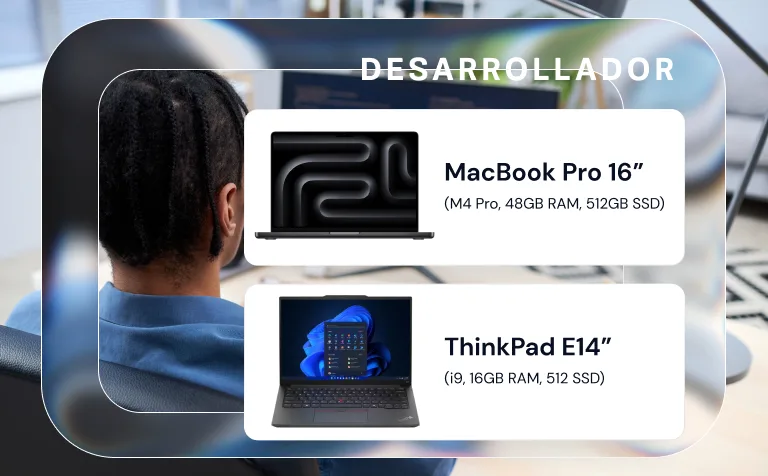
For web development, backend, or general engineering tasks, a reasonable baseline today is 16 GB of RAM and 512 GB of storage. If the person uses Docker, virtual machines, multiple local services, or heavier environments, it's worth going up to 24 GB or 32 GB to avoid operational bottlenecks.
That said, if the role includes iOS, macOS, or native testing in the Apple ecosystem, the conversation changes. Xcode still demands Apple hardware and compatible operating system versions, so there Mac stops being a preference and becomes a work requirement.
Design and creative profiles
For graphic design, visual content, branding, or creative marketing, it's worth not going below 16 GB of RAM and starting with 512 GB of storage, with the option to go up to 1 TB when there's frequent work with heavy files. Adobe maintains 16 GB or more as the recommended level for desktop Photoshop, both on Windows and macOS.
In this profile, the choice between Mac and Windows depends less on the brand and more on the workflow. For light creativity and mobility, a line like Air or a premium Windows can solve it well. For heavy editing or intensive multitasking, it's worth going to a pro category and avoiding tight configurations.
People, Finance, Operations, and Administration
Here a frequent mistake usually appears: buying more powerful equipment than needed “just in case”. For most of these profiles, what matters most isn't having the most expensive equipment, but one that's stable, easy to administer, with good battery and solid performance for office multitasking. In practical terms, 16 GB of RAM and 256 to 512 GB of storage tend to be a healthy baseline to standardize without falling short too quickly.
This is the type of profile where a good standard fleet policy brings more value than a collection of exceptions. And that's where Bord adds from the operational side: marketplace, official providers, traceability, and centralized device management.
Sales, Customer Success, and Leadership
In these roles, the ideal equipment isn't always the most powerful, but the one that best supports mobility: good weight, autonomy, audio, camera, and stable experience for meetings, travel, and hybrid work. A bad purchase here doesn't show up as much in benchmarks, but in small daily frictions: bad battery, heavy equipment, overheating, or poor video call experience.

Mac or Windows: the right answer depends on usage
Mac usually makes more sense when there's creative work, premium mobility, or a technical need to operate within the Apple ecosystem. Windows usually has more strength when the company seeks variety of models, corporate standardization, and procurement scale. Neither of the two answers is universal.
From Bord's side, this is also reflected in the offering and commercial positioning: the company communicates that it's an Apple Business Partner and operates with official partners in the region, in addition to centralizing the purchase and management of devices for businesses.
In LATAM, buying well isn't enough: you also have to deploy well
This is the point many companies underestimate. Even if they choose the right equipment, the value is lost if the employee receives it late, without configuration, without enrollment, or without visibility for IT.
At Apple, Apple Business Manager is part of the framework to manage organizations and corporate devices. In Windows, Windows Autopilot is designed to preconfigure new equipment and leave it ready for productive use, while Microsoft Intune helps protect and manage devices, apps, and data in the organization. That deployment and control approach also appears in Board's content, which remote onboarding with devices configured and ready to use from day one.
The most common mistakes when choosing equipment for remote employees
The first is buying by brand. Brand matters, but it doesn't replace analysis of role and stack.
The second is using the same configuration for the entire company. It simplifies procurement, yes, but it often shifts the problem to productivity, support tickets, and premature replacements.
The third is forgetting regional operations. In LATAM, a good decision also considers provider, stock, invoicing, traceability, reverse logistics, and local support. Bord presents exactly that integrated approach: equipping, tracking, storing, recovering, and supporting within the same operation.
The fourth is thinking only about delivery and not the end of the cycle. Offboarding, pickup, secure storage, and asset recovery are also part of the original decision. If they aren't considered from the start, the cost shows up later.
A Smarter Way to Choose
A healthy policy for remote teams in LATAM usually looks like this: a standard baseline for operational and administrative profiles, a reinforced line for development, a creative or pro line for design and heavy production, and exceptions justified by stack or role criticism.
That reduces friction, improves budget, and makes support simpler. But for it to work, the company needs an operation that supports it. That's where an isolated purchase falls short and a platform like Bord starts to make more sense: a single flow to equip, deliver, track, maintain, and close the asset's lifecycle.
Conclusion
Choosing a laptop for remote work well isn't buying “the best notebook”. It's making a decision that combines role, stack, and regional operations. When that's done well, the employee works better from day one, IT gains control, and the company avoids costs that usually appear later: urgencies, replacements, failed deliveries, non-standard configurations, and untraced assets.
The right laptop isn't the most expensive or the cheapest. It's the one that best fits the work to be done and the operation your company can sustain in LATAM.
If your company needs to equip talent in different countries without losing control, Bord helps you centralize purchase, deployment, traceability, and lifecycle from a single regional operation.
Frequently asked questions
How to choose a laptop for remote work?
First define the role, the software the person uses, the country where they'll work, and your company's capacity to deliver, configure, support, and recover that equipment.
Mac or Windows for remote employees?
It depends on usage. For iOS or macOS development, Mac can be mandatory due to Xcode compatibility. For broad corporate fleets, Windows usually offers more variety and standardization flexibility.
How much RAM does a corporate laptop need today?
For general use, 16 GB is a reasonable baseline. For design or more demanding work, it's worth considering 16 GB or more; Adobe maintains that level as recommended for Photoshop.
What changes when the company operates across multiple LATAM countries?
Stock, delivery times, invoicing, provider, configuration, traceability, support, and asset recovery all change. That's why the purchase should be thought of as part of a regional operation, not as an isolated order.
Why isn't buying well enough?
Because afterward you have to deploy, enroll, monitor, repair, and recover the equipment. Windows Autopilot and Intune show that deployment and management are also part of the decision.